New Version 1.0.0 is here. The first release: every mode, every output form and both debuggers, in one zip. How it works ›
Signature Lab cover: nine byte boxes reading 48 8B 05, four orange wildcards, then 48 85

Signature Lab logoSignature Lab

Signature maker plugin for x64dbg
Price
Free
Version
1.0.0
Platform
x64dbg
License
MIT
Free & Open Source x64dbg Plugin Signature Scanning C++20 32 & 64-bit
A signature is how you find the same code again after the game updates: the bytes of an instruction and its neighbours, with the parts that change between builds replaced by wildcards. Getting one right by hand means knowing which bytes are addresses that will move and which are code that will not, then checking that the result matches exactly once. Signature Lab does all of that from a right-click in x64dbg. It decodes every instruction, masks call targets, RIP-relative displacements and absolute addresses, keeps opcodes and struct offsets, and counts matches across the whole module. When the code at an address is not unique, it signs the code that refers to it instead and tells you how to get from the match back to the address. It is the signature-scanning chapter of The Game Hacker’s Handbook, automated.
Free
Plugin for x64dbg and x32dbg. Extract the zip into your x64dbg folder
↓ Download from GitHub View Source on GitHub
Developer
Game Reversal Club
Open Source Software

See all software from this developer

Screenshots

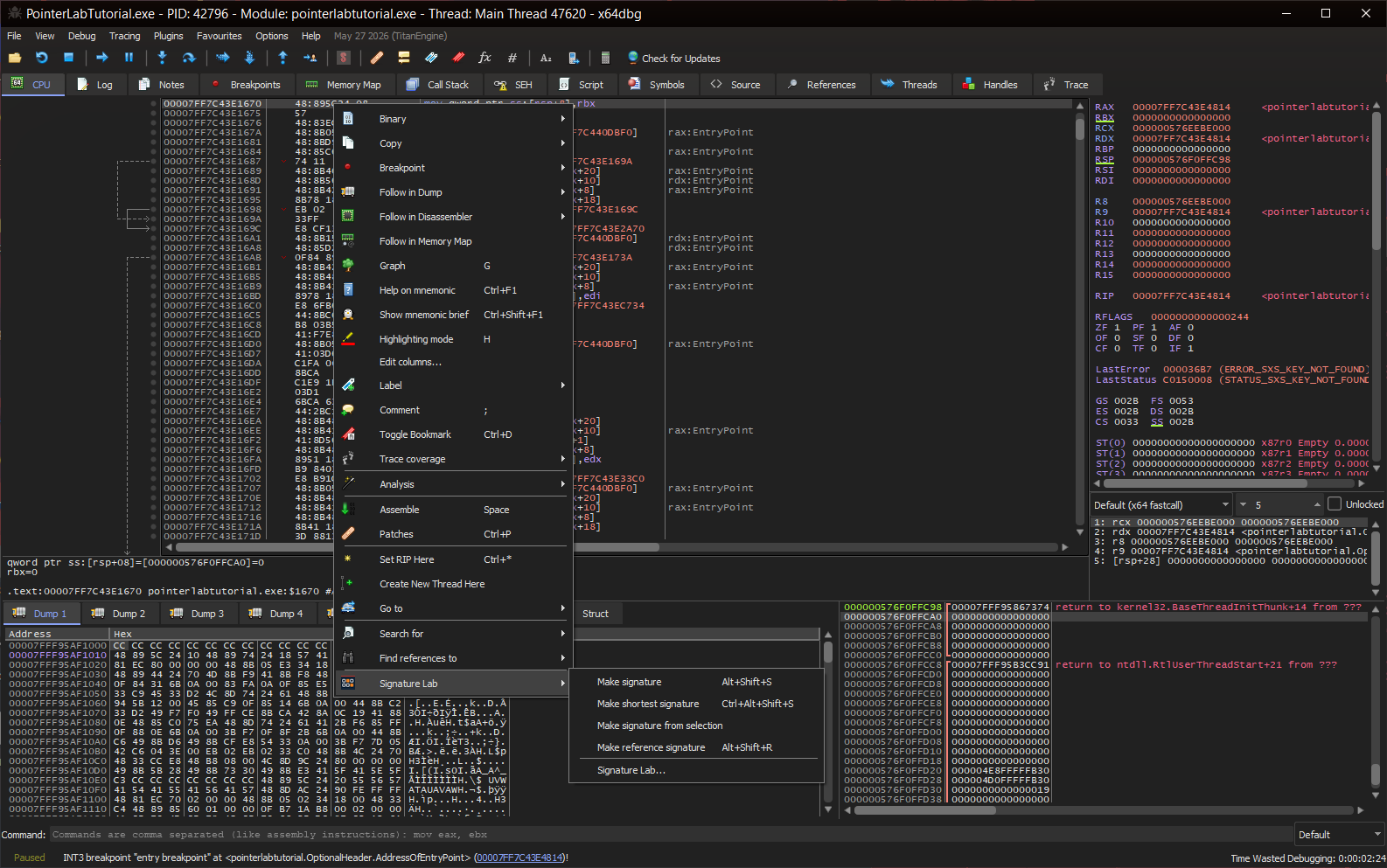
The x64dbg CPU view with an instruction right-clicked and the Signature Lab submenu open: Make signature (Alt+Shift+S), Make shortest signature (Ctrl+Alt+Shift+S), Make signature from selection, Make reference signature (Alt+Shift+R), and Signature Lab...
Right-click, Signature Lab. Four ways to sign the selected instruction, three of them on a hotkey, and the dialog for everything else. The dump view gets Make reference signature too, for data.
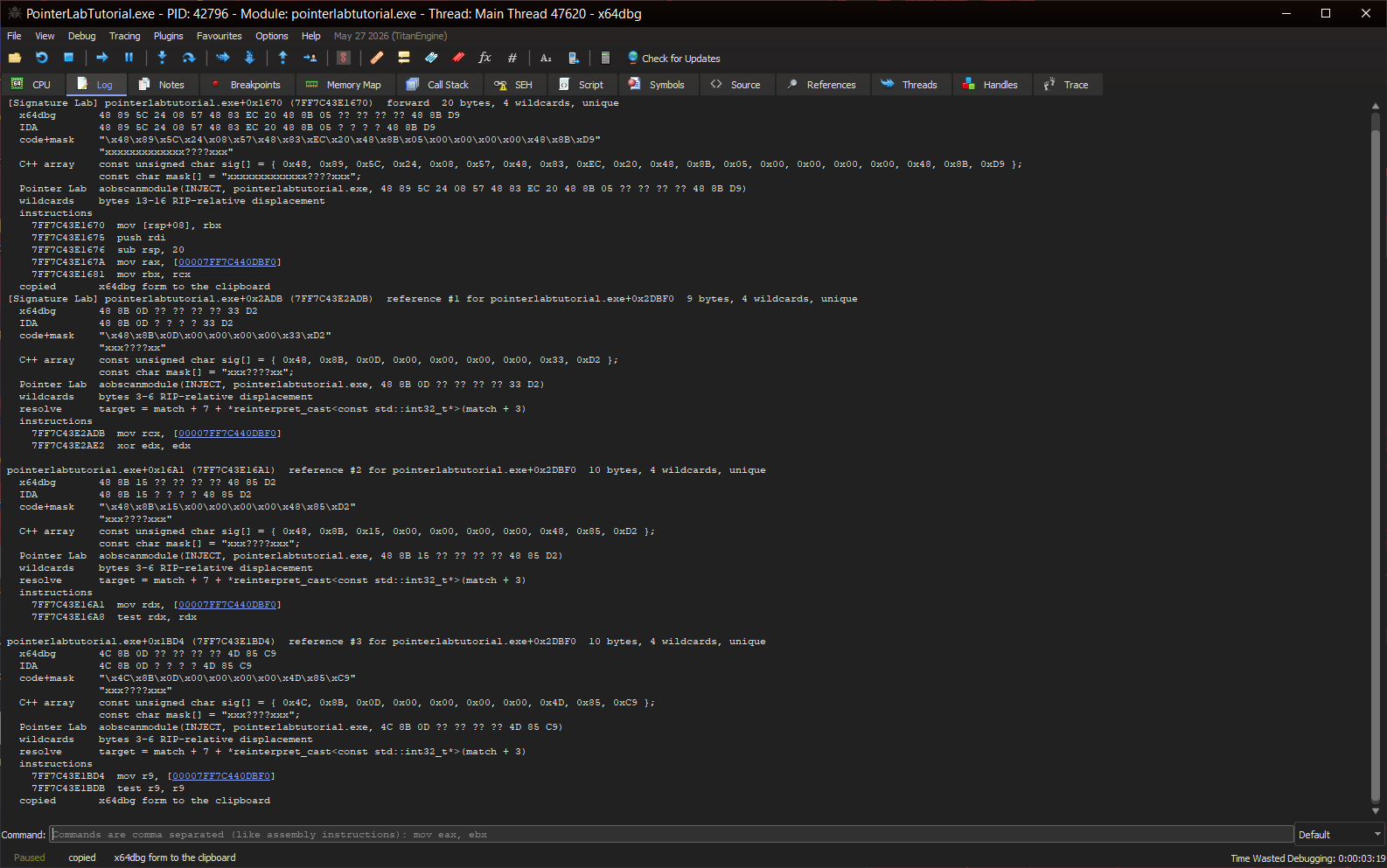
The x64dbg log showing the forward signature for pointerlabtutorial.exe+0x1670, then three reference signatures for pointerlabtutorial.exe+0x2DBF0, each unique and each with its resolve line.
A signature and three reference signatures. The function reads a global, and Make reference signature on that global signs the three best instructions that refer to it. Each one comes with the expression that turns a match back into the global’s address.
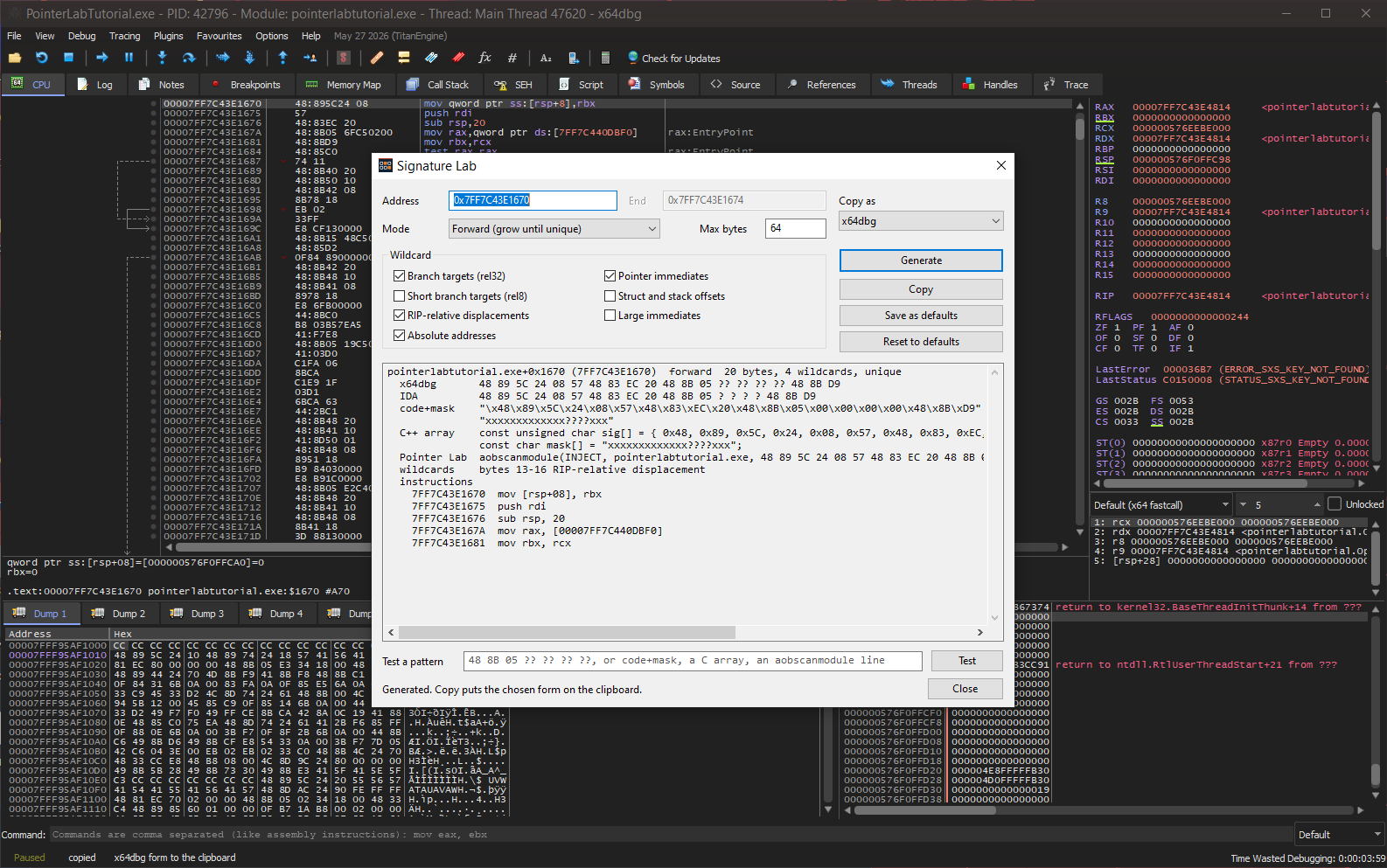
The Signature Lab dialog over x64dbg, showing the address, mode and output form, the seven wildcard class checkboxes, and the generated signature in every form.
Every option in one place. Mode, byte budget, output form and the seven wildcard classes, with the result in every form below them. Save the choices as defaults and the hotkeys and commands use them too.
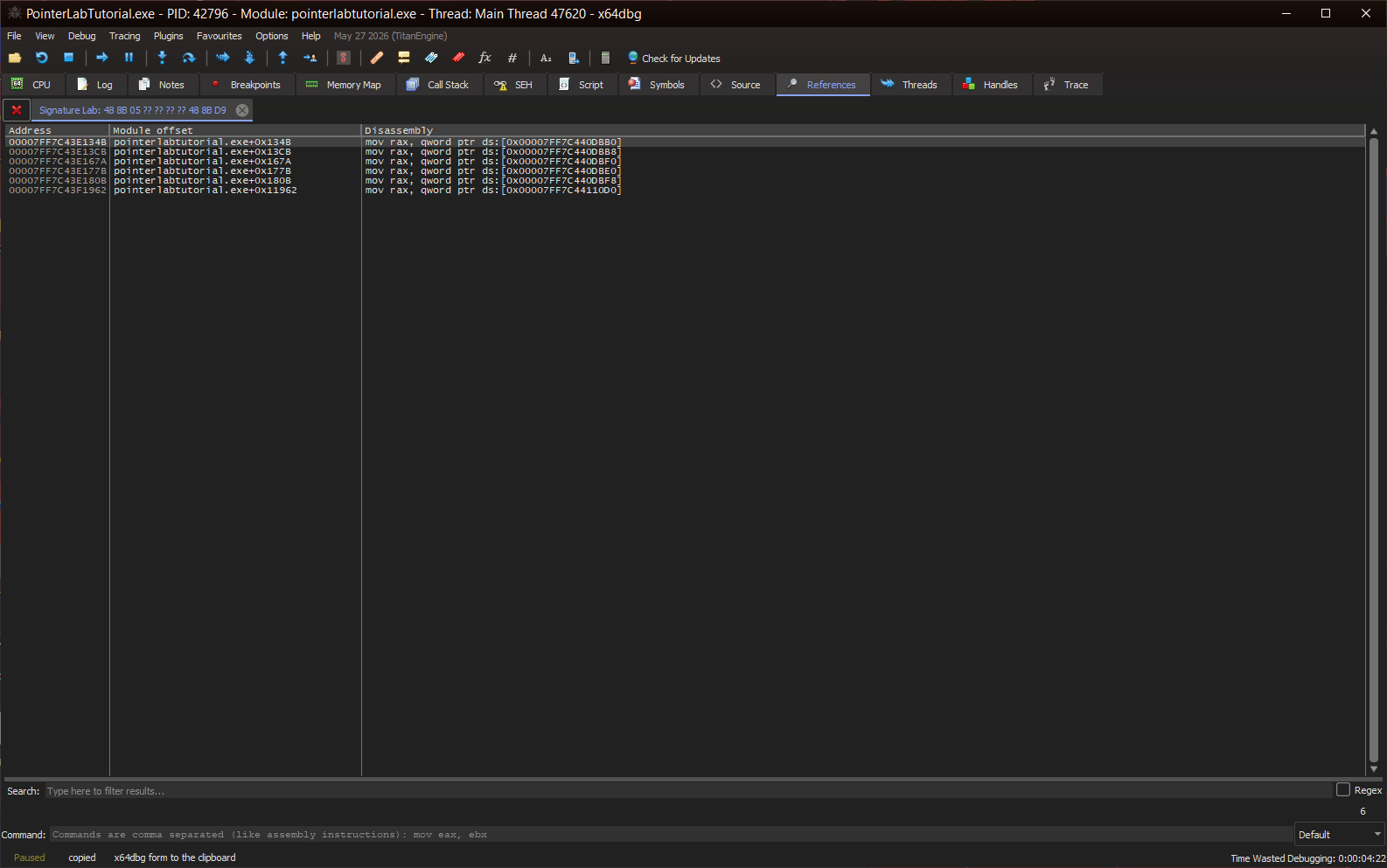
The x64dbg References tab titled Signature Lab: 48 8B 05 ?? ?? ?? ?? 48 8B D9, listing six matches, each a mov rax from a different global.
Why a signature is as long as it is. The last ten bytes of the forward signature in the log, tested on their own, match six places in the module. The prologue in front of them is what makes the full signature unique.

What You Get

Press Alt+Shift+S on an instruction and this goes to x64dbg’s log, with the x64dbg form already on the clipboard. This is real output, from a function in the tutorial that ships with Pointer Lab.

[Signature Lab] pointerlabtutorial.exe+0x1670 (7FF7C43E1670)  forward  20 bytes, 4 wildcards, unique
  x64dbg       48 89 5C 24 08 57 48 83 EC 20 48 8B 05 ?? ?? ?? ?? 48 8B D9
  IDA          48 89 5C 24 08 57 48 83 EC 20 48 8B 05 ? ? ? ? 48 8B D9
  code+mask    "\x48\x89\x5C\x24\x08\x57\x48\x83\xEC\x20\x48\x8B\x05\x00\x00\x00\x00\x48\x8B\xD9"
               "xxxxxxxxxxxxx????xxx"
  Pointer Lab  aobscanmodule(INJECT, pointerlabtutorial.exe, 48 89 5C 24 08 57 48 83 EC 20 48 8B 05 ?? ?? ?? ?? 48 8B D9)
  wildcards    bytes 13-16 RIP-relative displacement
  instructions
    7FF7C43E1670  mov [rsp+08], rbx
    7FF7C43E1675  push rdi
    7FF7C43E1676  sub rsp, 20
    7FF7C43E167A  mov rax, [00007FF7C440DBF0]
    7FF7C43E1681  mov rbx, rcx
  copied       x64dbg form to the clipboard

The four masked bytes are the displacement of mov rax, [rip+…], which changes whenever the code or the global it reads moves. Everything else is the shape of the function, which does not.

How It Works

Wildcards by operand
Every instruction is decoded with Zydis, so each byte is known to be opcode, displacement, immediate or branch offset. The report names every masked byte and why, and each of the seven classes is a toggle.
Unique means unique
The whole module is read page by page and every match is counted, not just the next few kilobytes. Growth continues past uniqueness until at least five bytes are fixed, so the signature survives the next build.
Knows where a function ends
A signature that runs past a ret, into int3 padding or past a tail jmp is matching whatever the linker put next. Signature Lab flags it rather than handing it over as if it were safe.
Reference signatures
When an address has no unique code of its own, or is data, Signature Lab signs the call, lea or mov that refers to it and prints the C++ expression that turns the match back into the address.
Every common form
x64dbg ??, IDA ?, code-style bytes and mask, a C++ array and a Pointer Lab aobscanmodule line, all logged at once. The clipboard gets the one you choose.
A tester for any pattern
Paste a pattern from a forum post or a book, in any of those forms, and every match is listed in x64dbg’s References tab. A mask whose length does not match its pattern is an error, not a silent miss.

Item Specifics

Name
Signature Lab
Author
Heath Howren (“Cyborg Elf”)
Version
1.0.0 (2026)
Type
Debugger plugin: byte-signature maker and tester
Platform
x64dbg (64-bit targets) and x32dbg (32-bit targets) on Windows
License
MIT License
Price
Free
Language
C++20
Disassembler
Zydis 4.1.1
Distribution
Zip that extracts over an x64dbg folder; .dp64 and .dp32
Requirements
x64dbg; tested with the 2026.05.27 snapshot. Nothing else: the C runtime is linked statically
Source Code

Features

Make signature (Alt+Shift+S)
Shortest unique signature
Signature from a selection
Reference signatures (Alt+Shift+R)
C++ resolve expression per reference
Operand-aware wildcards (Zydis)
Seven wildcard classes, each a toggle
A reason for every masked byte
Whole-module uniqueness check
Five-fixed-byte floor
Function-end warnings
x64dbg and IDA pattern forms
Code+mask and C++ array forms
Pointer Lab aobscanmodule lines
Pattern tester for any form
Matches listed in References
Mask-length check
sigmake, sigxref, sigtest commands
$result for scripts
Options dialog with saved defaults
Works in the dump view too
64-bit and 32-bit builds
64 unit tests, run in CI

Before You Download

Intended use. Signature Lab is for studying software you own or are authorized to analyze: your own programs, single-player games, CTF binaries, and the Handbook’s lab targets. Using a debugger against online or competitive games will very likely trip anti-cheat software and get the account banned, and modifying software you do not have permission to modify may be illegal where you live. This is a research tool.

One pattern syntax trap. In x64dbg’s own pattern syntax a single ? is half a byte, so an IDA-style pattern such as 48 8B 05 ? ? ? ? finds nothing in x64dbg’s Find Pattern. Use the x64dbg form, with ??, inside x64dbg. Signature Lab’s own tester reads both.

The binaries are unsigned. x64dbg loads them without complaint, but antivirus software may flag a debugger plugin that reads process memory. Build it from source if you would rather not take a binary on trust.

Names that will not change. The Handbook quotes Signature Lab’s menu entries, hotkeys, commands and settings, so all of them are pinned for the whole 1.x series. A change to any of them would be a 2.0.